Activity: Plan Subsystem Integration
| Purpose - To plan the order in which the elements contained in an implementation subsystem should be integrated. | |
| Role: Integrator | |
| **Frequency:**As required, typically multiple times in each Construction and Transition iteration, and at least once in each Elaboration iteration. | |
| Steps - [Define the Builds](#Define the Builds) - [Identify the Classes](#Identify the Classes) - [Update the Subsystem’s Imports](#Update the Subsystem’s Imports) | |
| Input Artifacts: - Implementation Element - Implementation Model - Implementation Subsystem - Integration Build Plan - Iteration Plan - Use-Case Realization | Resulting Artifacts: - Integration Build Plan |
| Tool Mentors: |
| Workflow Details: - Implementation - Implement Components |
Define the Builds
Study the use cases and scenarios that have been selected for the current iteration. Select one, or several scenarios, that will be the goal for each increment of the integration. It may be necessary to select only a part of a scenario that concerns this subsystem.
Capture the plan to integrate the subsystem, either in the project’s Integration Build Plan, or in an integration build plan local to the subsystem.
Identify the Classes
Identify the classes that participate in the selected scenarios. Each scenario is described in a design use-case realization’s sequence diagrams, communication diagrams, or class diagrams. Identify which classes you need to implement, and which classes have already been implemented. Also identify the classes that do not participate in the scenario, but are needed as stubs.
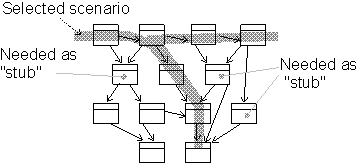
Classes are identified from design use-case realizations.
Update the Subsystem’s Imports
Identify which other implementation subsystems are needed for this build. Decide which version of each subsystem to use. Update import dependencies for this subsystem to the correct versions of the other subsystems.
If new system baselines have recently been promoted, the integrator will also have to decide when to update (rebaseline) the subsystem integration workspace. This decision is based on where in the development cycle you are. If your subsystem development is unstable in some critical area, then you may decide to postpone rebaselining.
When it is late in the project, and close to a release (whether internal or external), it is crucial that subsystems have consistent import sets. Then there is a greater urgency to stay current with the system baselines.