Collegiate Sports Paging System
Requirements Management Plan
Version 1.0
Revision History
| Date | Version | Description | Author |
| July 2, 2000 | 1.0 | Initial release | Context Integration |
Table of Contents
1.3Definitions, Acronyms, and Abbreviations
2.1Organization, Responsibilities, and Interfaces
2.2Tools, Environment, and Infrastructure
3.The Requirements Management Program
3.1Requirements Identification
3.5Requirements Change Management
Requirements Management Plan
1. Introduction
1.1 Purpose
This document describes the guidelines used by the Collegiate Sports Paging System (CSPS) project for establishing the requirements documents, requirement types, requirements attributes, and tracability in order to manage their software project requirements. It will also serve as the configuration document for the Rational RequisitePro**â requirements management tool.
1.2 Scope
This plan pertains to all phases of the project.
1.3 Definitions, Acronyms, and Abbreviations
See Glossary
1.4 References
CSPS Software Development Plan
CSPS Development Case
CSPS Measurement Plan
CSPS Configuration Management Plan
2. Requirements Management
2.1 Organization, Responsibilities, and Interfaces
See the CSPS Software Development Plan.
2.2 Tools, Environment, and Infrastructure
Rational RequisitePro will be used to manage requirements. For other information about the infrastructure and environment, refer to the CSPS Software Development Plan.
3. The Requirements Management Program
3.1 Requirements Identification
| Artifact (Document Type) | Requirement Type | Description |
| Vision (VIS) | Stakeholder Need (NEED) | Key stakeholder or user need |
| Vision (VIS) | Feature (FEAT) | Conditions or capabilities of this release of the system |
| Use-Case Model | Use Case (UC) | Use cases for this release, documented in Rational Rose, with details in Rational RequisitePro. |
| Supplementary Specification (SS) | Supplementary Requirement (SUPP) | Non-functional requirements that are not captured in the use-case model |
Table 3.1?1 Requirement Artifacts and Types
3.2 Traceability
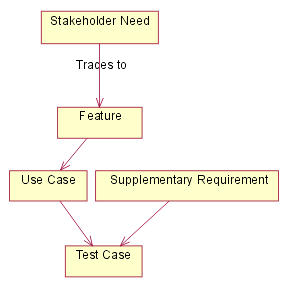
Figure -1 - Traceability diagram
Criteria for FEAT
Features will be traced to use cases.
Criteria for NEED
User needs will be traced to features(FEAT). Any needs not traced to a FEAT will not be implemented.
Criteria for UC
Use-cases will be traced to test cases.
Criteria for SUPP
Supplemental specifications will be traced to test cases.
3.3 Attributes
Attributes for FEAT
Status
Set after negotiation and review by the project management team. Tracks progress during definition of the project baseline.
| Proposed | Used to describe features that are under discussion but have not yet been reviewed and accepted by the “official channel,” such as a working group consisting of representatives from the project team, product management and user or customer community. |
| Approved | Capabilities that are deemed useful and feasible and have been approved for implementation by the official channel. |
| Incorporated | Features incorporated into the product baseline at a specific point in time. |
Benefit
Set by Marketing, the product manager or the business analyst. All requirements are not created equal. Ranking requirements by their relative benefit to the end user opens a dialogue with customers, analysts and members of the development team. Used in managing scope and determining development priority.
| Critical | Essential features. Failure to implement means the system will not meet customer needs. All critical features must be implemented in the release or the schedule will slip. |
| Important | Features important to the effectiveness and efficiency of the system for most applications. The functionality cannot be easily provided in some other way. Lack of inclusion of an important feature may affect customer or user satisfaction, or even revenue, but release will not be delayed due to lack of any important feature. |
| Useful | Features that are useful in less typical applications, will be used less frequently, or for which reasonably efficient workarounds can be achieved. No significant revenue or customer satisfaction impact can be expected if such an item is not included in a release. |
Effort
Set by the development team. Because some features require more time and resources than others, estimating the number of team or person-weeks, lines of code required or function points, for example, is the best way to gauge complexity and set expectations of what can and cannot be accomplished in a given time frame. Used in managing scope and determining development priority.
Risk
Set by development team based on the probability the project will experience undesirable events, such as cost overruns, schedule delays or even cancellation. Most project managers find categorizing risks as high, medium, and low sufficient, although finer gradations are possible. Risk can often be assessed indirectly by measuring the uncertainty (range) of the projects teams schedule estimate.
Stability
Set by analyst and development team based on the probability the feature will change or the team’s understanding of the feature will change. Used to help establish development priorities and determine those items for which additional elicitation is the appropriate next action.
Target Release
Records the intended product version in which the feature will first appear. This field can be used to allocate features from a Vision document into a particular baseline release. When combined with the status field, your team can propose, record and discuss various features of the release without committing them to development. Only features whose Status is set to Incorporated and whose Target Release is defined will be implemented. When scope management occurs, the Target Release Version Number can be increased so the item will remain in the Vision document but will be scheduled for a later release.
Assigned To
In many projects, features will be assigned to “feature teams” responsible for further elicitation, writing the software requirements and implementation. This simple pull down list will help everyone on the project team better understand responsibilities.
Reason
This text field is used to track the source of the requested feature. Requirements exist for specific reasons. This field records an explanation or a reference to an explanation. For example, the reference might be to a page and line number of a product requirement specification, or to a minute marker on a video of an important customer interview.
Attributes for NEED
Status
Set after negotiation and review by the project management team. Tracks progress during definition of the project baseline.
| Proposed | Used to describe needs that are under discussion but have not yet been reviewed and accepted by the “official channel,” such as a working group consisting of representatives from the project team, product management and user or customer community. |
| Approved | Capabilities that are deemed useful and feasible and have been approved for implementation by the official channel. |
| Incorporated | Needs being met by the product baseline at a specific point in time. |
Effort
Set by the development team. Because some needs require more time and resources than others, estimating the number of team or person-weeks, lines of code required or function points, for example, is the best way to gauge complexity and set expectations of what can and cannot be accomplished in a given time frame. Used in managing scope and determining development priority.
Risk
Set by development team based on the probability the project will experience undesirable events, such as cost overruns, schedule delays or even cancellation. Most project managers find categorizing risks as high, medium, and low sufficient, although finer gradations are possible. Risk can often be assessed indirectly by measuring the uncertainty (range) of the projects teams schedule estimate.
Stability
Set by analyst and development team based on the probability the need will change or the team’s understanding of the need will change. Used to help establish development priorities and determine those items for which additional elicitation is the appropriate next action.
Target Release
Records the intended product version in which the need will first be met. This field can be used to allocate features from a Vision document into a particular baseline release. When combined with the status field, your team can propose, record and discuss various features of the release without committing them to development. Only needs whose Status is set to Incorporated and whose Target Release is defined will be met. When scope management occurs, the Target Release Version Number can be increased so the item will remain in the Vision document but will be scheduled for a later release.
Reason
This text field is used to track the source of the need. Requirements exist for specific reasons. This field records an explanation or a reference to an explanation. For example, the reference might be to a page and line number of a product requirement specification, or to a minute marker on a video of an important customer interview.
Attributes for UC
Status
Set after negotiation and review by the project management team. Tracks progress during definition of the project baseline.
| Proposed | Used to describe use-cases that are under discussion but have not yet been reviewed and accepted by the “official channel,” such as a working group consisting of representatives from the project team, product management and user or customer community. |
| Approved | Use-cases that are deemed useful and feasible and have been approved for implementation by the official channel. |
| Incorporated | Use-cases incorporated into the product baseline at a specific point in time. |
Benefit
Set by Marketing, the product manager or the business analyst. All requirements are not created equal. Ranking use-cases by their relative benefit to the end user opens a dialogue with customers, analysts and members of the development team. Used in managing scope and determining development priority.
| Critical | Essential use-cases. Failure to implement means the system will not meet customer needs. All critical use-cases must be implemented in the release or the schedule will slip. |
| Important | Use-cases important to the effectiveness and efficiency of the system for most applications. The functionality cannot be easily provided in some other way. Lack of inclusion of an important feature may affect customer or user satisfaction, or even revenue, but release will not be delayed due to lack of any important feature. |
| Useful | Use-cases that are useful in less typical applications, will be used less frequently, or for which reasonably efficient workarounds can be achieved. No significant revenue or customer satisfaction impact can be expected if such an item is not included in a release. |
Effort
Set by the development team. Because some use-cases require more time and resources than others, estimating the number of team or person-weeks, lines of code required or function points, for example, is the best way to gauge complexity and set expectations of what can and cannot be accomplished in a given time frame. Used in managing scope and determining development priority.
Risk
Set by development team based on the probability the project will experience undesirable events, such as cost overruns, schedule delays or even cancellation. Most project managers find categorizing risks as high, medium, and low sufficient, although finer gradations are possible. Risk can often be assessed indirectly by measuring the uncertainty (range) of the projects teams schedule estimate.
Stability
Set by analyst and development team based on the probability the use-case will change or the team’s understanding of the use-case will change. Used to help establish development priorities and determine those items for which additional elicitation is the appropriate next action.
Target Release
Records the intended product version in which the use-case will first appear. This field can be used to allocate use-cases from a Use Case Survey document into a particular baseline release. When combined with the status field, your team can propose, record and discuss various use-cases of the release without committing them to development. Only use-cases whose Status is set to Incorporated and whose Target Release is defined will be implemented. When scope management occurs, the Target Release Version Number can be increased so the item will remain in the Vision document but will be scheduled for a later release.
Assigned To
In many projects, use-cases will be assigned to teams responsible for further elicitation, writing the software requirements and implementation. This simple pull down list will help everyone on the project team better understand responsibilities.
Reason
This text field is used to track the source of the requested use-case. Requirements exist for specific reasons. This field records an explanation or a reference to an explanation. For example, the reference might be to a page and line number of a product requirement specification, or to a minute marker on a video of an important customer interview.
Attributes for SUPP
Status
Set after negotiation and review by the project management team. Tracks progress during definition of the project baseline.
| Proposed | Used to describe supplemental specifications that are under discussion but have not yet been reviewed and accepted by the “official channel,” such as a working group consisting of representatives from the project team, product management and user or customer community. |
| Approved | Capabilities that are deemed useful and feasible and have been approved for implementation by the official channel. |
| Incorporated | Supplemental specifications incorporated into the product baseline at a specific point in time. |
Benefit
Set by Marketing, the product manager or the business analyst. All requirements are not created equal. Ranking requirements by their relative benefit to the end user opens a dialogue with customers, analysts and members of the development team. Used in managing scope and determining development priority.
| Critical | Essential specification. Failure to implement means the system will not meet customer needs. All critical features must be implemented in the release or the schedule will slip. |
| Important | Specifications important to the effectiveness and efficiency of the system for most applications. The functionality cannot be easily provided in some other way. Lack of inclusion of an important specification may affect customer or user satisfaction, or even revenue, but release will not be delayed due to lack of any important feature. |
| Useful | Specifications that are useful in less typical applications, will be used less frequently, or for which reasonably efficient workarounds can be achieved. No significant revenue or customer satisfaction impact can be expected if such an item is not included in a release. |
Effort
Set by the development team. Because some specifications require more time and resources than others, estimating the number of team or person-weeks, lines of code required or function points, for example, is the best way to gauge complexity and set expectations of what can and cannot be accomplished in a given time frame. Used in managing scope and determining development priority.
Risk
Set by development team based on the probability the project will experience undesirable events, such as cost overruns, schedule delays or even cancellation. Most project managers find categorizing risks as high, medium, and low sufficient, although finer gradations are possible. Risk can often be assessed indirectly by measuring the uncertainty (range) of the projects teams schedule estimate.
Stability
Set by analyst and development team based on the probability the specification will change or the team’s understanding of the specification will change. Used to help establish development priorities and determine those items for which additional elicitation is the appropriate next action.
Target Release
Records the intended product version in which the specified attribute or feature will first appear. This field can be used to allocate specifications into a particular baseline release. When combined with the status field, your team can propose, record and discuss various specifications of the release without committing them to development. Only specifications whose Status is set to Incorporated and whose Target Release is defined will be implemented. When scope management occurs, the Target Release Version Number can be increased so the item will remain in the supplemental specification document but will be scheduled for a later release.
Assigned To
In many projects, specified attributes or features will be assigned to teams responsible for further elicitation, writing the software requirements and implementation. This simple pull down list will help everyone on the project team better understand responsibilities.
3.4 Reports and Measures
See the CSPS Measurement Plan.
3.5 Requirements Change Management
See the CSPS Configuration Management Plan.
The following access groups will be set up to control access to requirements in Rational RequisitePro.
·Tool Administrator - has full access to every part of the tool. Can add and remove people, change their access rights, etc.
·Author - can create new requirements
·Project Manager - sets the status of requirements
·Tester_QA - sets the status of test case requirements.
3.6 Workflows and Activities
See the CSPS Development Case.
4. Milestones
See the CSPS Software Development Plan.
5. Training and Resources
See the CSPS Software Development Plan.