Navigating the Process
RUP(统一软件开发过程) consists of a set of HTML pages you can view using any browser that supports frames, including Netscape Navigator and Microsoft Internet Explorer. The following figure shows the major elements used to browse the Rational Unified Process(统一软件开发过程). Click on an area for more information.
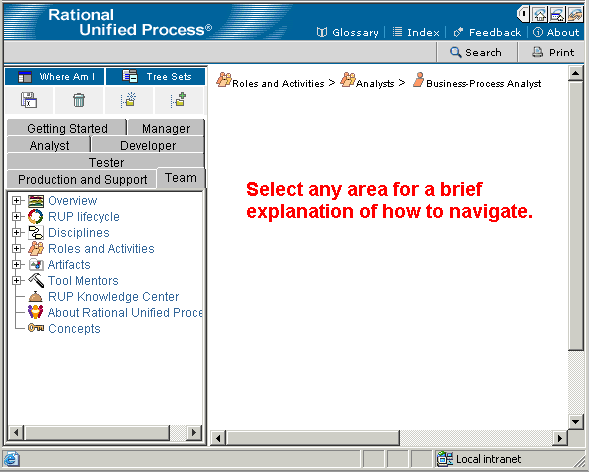
Elements of RUP’s Browser Environment(环境)
Glossary(术语表)
Clicking this button will launch a separate window containing the glossary which alphabetically lists the terms used in RUP, along with definitions and links to example pages.
Index
Clicking on the Index button launches a separate window containing an alphabetic listing of topics in the Process. Clicking on a hyperlink in the index will cause the related page to be displayed in the main window.
Feedback
Clicking on the Feedback button launches a separate window with an e-mail message to Rational feedback, automatically referencing the page currently appearing in the main window.
About
Clicking on the About button launches a pop-up window with the Rayional copywrite current version number.
Search
Search allows a keyword to be entered and searched for in the process, causing all pages which are relevant to the topic to be displayed in a Search Results window. The Search Utility works on keyword topics, rather than searching for strings in process content pages.
The Print button sends the content in the main window to your printer.
Control Strip
This collapsable button opens and closes a navigation bar that contains links to the Rational Home Page, the Rational Product Page and the Rational Developer(开发人员) Network.
Tree Path
This Tree Path shows the treebowser path to the current page in the main window. The purpose of this path is make clear the contextual location of the page within the RUP treebrowser. It does not necessarily reflect the actual path taken to arrive at the page. Clicking on a hyperlinked entry displays the corresponding page in the main window.
Main Content Frame
This frame is where the RUP content is displayed.