Concepts: Product Directory Structure
The Product Directory Structure serves as a logically nested placeholder for all versionable product-related artifacts. Artifacts are produced as result of the following development process lifecycle and for the development of each constituent implementation element of the overall system.
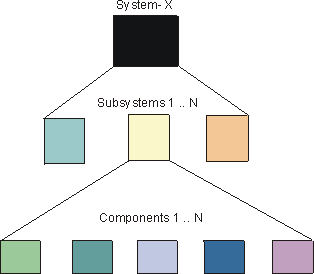
The following figure shows that System-X consists of “N” subsystems and each subsystem consists of “N” components. The Product Directory Structure provides a common placeholder for the various artifacts that are required for the development of each part of the overall system.
Topics
In the Rational Unified Process artifacts are grouped and described in terms of information sets. The information sets are:
Projects could organize artifacts by information set, however, that would not take into account how the overall system is to be developed and then assembled from its constituent parts. The Product Directory Structure is logically structured to show how components are nested and has the essential information required to create them in an overall context of a system or subsystem.
The Product Directory Structure is a placeholder framework and provides a navigational map to all project-related artifacts. The artifacts could be physically placed within the various directories or they could be referenced from given locations.
System Product Directory Structure
Although an experienced software architect may have a good idea of system composition at the outset, the view of major developmental components emerges as a result of Analysis & Design-related activities to define and refine candidate architectures.
The following table provides a Product System Directory Structure pattern that could be used as a “Product Directory Structure” in the initial phases of project development whereas the precise details of composite subsystems and architectural layering has yet to be determined.
System Level Product Directory Structure
| System Requirements | Models | Use-Case Model | Use-Case Package | | Database | Requirements Attributes | | | Documents | Vision | | | Glossary | | | Stakeholder Requests | | | Supplementary Specifications | | | Software Requirement Specs | | | Storyboards | | | Reports | Use-Case Model Survey | | | Use-Case Report | | | System Design and Implementation | Models | Analysis Model | Use-Case Realization | | Design Model | Design Subsystem | | Interface | | Design Package | | Data Model | | | Workload Analysis Document | | | User-Interface Prototype | | | Documents | Software Architecture Document | | | Design Model Survey | | | Navigation Map | | | Subsystem-1 | [Subsystem Directory Structure](#Subsystem Level Product Directory Structure) | | | Subsystem-N | [Subsystem Directory Structure](#Subsystem Level Product Directory Structure) | | | System Integration | Plans | Integration Build Plan | | | Libraries | | | | System Test | Test Plan | Test Suites | | | Test Cases | Test Scripts | | | Test Data | | | | Test Results | | | | System Deployment | Deployment Plan | | | | Documents | Release Notes | | | Manuals | End-User Support Material | | | Training Materials | | | Installation Artifacts | | | | System Management | Plans | Software Development Plan | | | Iteration Plan | Requirements Management Plan | | Risk List | Risk Management Plan | | Development Case | Infrastructure Plan | | Product Acceptance Plan | Configuration Management Plan | | Documentation Plan | QA Plan | | Problem Resolution Plan | Subcontractor Management Plan | | Process Improvement Plan | Measurement Plan | | Assessments | Iteration Assessment | | | Development Organization Assessment | | | Status Assessment | | | Tools | Development Environment Tools | Editors | | | Compilers | | | Configuration Management Tools | Rational ClearCase | | | Requirements Management Tools | Rational RequisitePro | | | Visual Modeling Tools | Rational Rose | | | Test Tools | Rational Test Factory | | | Defect Tracking | Rational ClearQuest | | | Standards and Guidelines | Requirements | Requirements Attributes | | | Project Specific Guidelines | | | Design | Project Specific Guidelines | | | Implementation | Project Specific Guidelines | | | Documentation | Manual Styleguide | |
Once Analysis & Design activities are underway, and there is an improved understanding about the number and nature of subsystems required in the overall system (Activity: Subsystem Design), the Product Directory Structure needs to be expanded to accommodate each subsystem.
The information in the System Product Directory Structure needs to be visible to all subsystems across the project. So apart from the product management, requirements and test information Standards and Guidelines would belong in the System Product Directory Structure. In this instance, Tools are included in the System Product Directory Structure, however, they could be in a higher level directory where a number of Systems could be using the same toolset.
Subsystem Directory Structure
The information in the Product Subsystem Directory Structure relates directly to the development of that particular subsystem. The number of ‘instantiations’ of the Subsystems Product Directory Structure is clearly related to number of subsystems decided upon as a result of the Analysis&Design activities.
As shown in the following figure (Drilling to the Executables), System-y has three subsystems (Subsystem-A, Subsystem-B and Subsystem-N). Each subsystem has the necessary information for its design and, eventual, implementation.
Drilling to the Executables
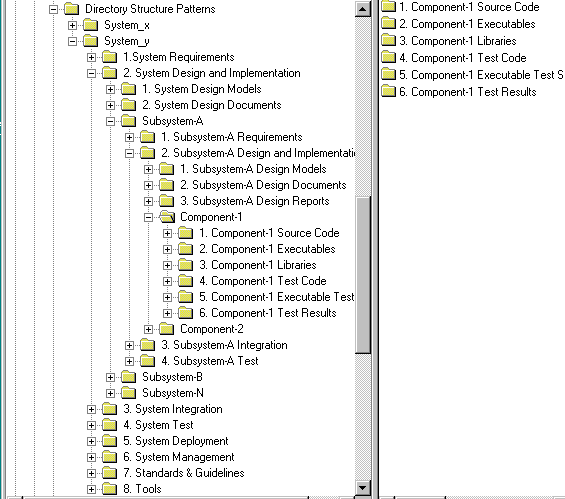
A generalized breakdown of the Subsystem Product Directory Structure is as follows:
Subsystem Level Product Directory Structure
| Subsystem-N Requirements | Models | Use-Case Model | Use-Case Package | | Storyboard | | Use-Case (text) | | | User-Interface Prototype | | | Database | Requirements Attributes | | | Documents | Vision | | | Glossary | | | Stakeholder Requests | | | Supplementary Specifications | | | Software Requirement Specs | | | Storyboards | | | Reports | Use-Case Model Survey | | | Use-Case Report | | | Subsystem-N Design and Implementation | Models | Analysis Model | Use-Case Realization | | Subsystem Design Model | Design Packages | | Interface Packages | | Test Packages | | Implementation Model | | | Data Model | | | Workload Model | | | Documents | Software Architecture Document | | | Design Model Survey | | | Navigation Map | | | Reports | Use-Case Realization Report | | | Component-1 | [Component-1 Directory](#Component Level Directory Structure) | | | Component-N | [Component-N Directory](#Component Level Directory Structure) | | | Subsystem-N Integration | Plans | Subsystem Integration Build Plan | | | Libraries | | | | Subsystem-N Test | Test Plan | Test Suites | | | Test Cases | Test Scripts | | | Test Results | | | | Test Data | | |
Component Directory Structure
The number of components is a result of subsystem design decisions. The following directory structure needs to be instantiated for each component to be developed.
Component Level Directory Structure
| Component | Source Code | | Object (Executable) Code | | Interfaces | | Test Code | | Executable Test Scripts | | Test Data | | Test Results |
One benefit of nesting directories in the prescribed manner is that all relevant contextual information on the development of a component is available, either at the same level, or the level above.
This type of logical nesting gives rise to the setting up of development and integration workspaces that can linked to the overall development [team structure](../../modeling_guides/md_prpln.md#Team Structure) .
The naming convention for artifacts is described in Activity: Establish CM Policies, Step: Define Configuration Identification Practices