**Collegiate Sports Paging Service
Navigation Map
Version 1.0**
Revision History
| Date | Version | Description | Author |
| October 8, 1999 | 1.0 | Initial version | Context Integration |
Table of Contents
- Introduction
- Overview
- [Navigation Map](#Navigation Map)
- [A Finalized Web Site Map](#A Finalized Web Site Map)
Introduction
Purpose
This document presents a graphical depiction of how navigation within the web site will move the user to various User Interface (UI) elements within the web site.
Scope
This document encompasses all major UI navigations that may be used in the web site.
Definitions, Acronyms and Abbreviations
See Glossary.
References
Overview
The Navigation Map presents a graphical representation of the manner in which a user may navigate between the various screens available within the system.
Navigation Map
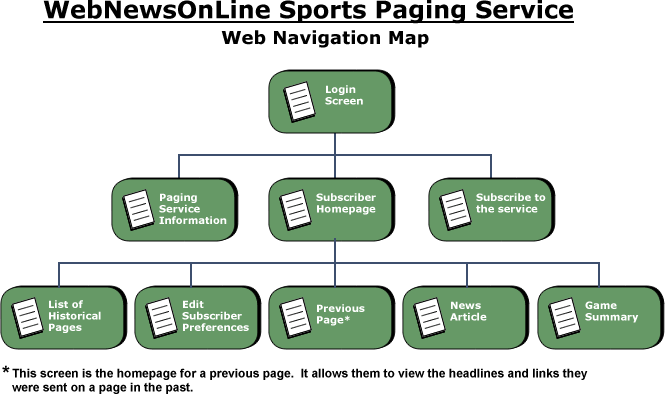
Figure -1 - Navigation Map
This simple navigation hierarchy shows the progression from one screen to another. The login screen is the gateway to the service, providing access to current subscribers as well as directing potential subscribers to information about the service and the page that allows them to subscribe. Once the user has reached their homepage, they have access to the news articles and game summaries for the links sent to them on their pager. They can also edit their subscription preferences and view historical pages.
A Finalized Web Site Map
This web site map primarily indicates the pages that are a part of the service and the links between them. A more developed map will be drawn as the web site is developed. This finalized map will include visual pages and non-visual components that service pages the user sees. It will also describe refined paths the user may take through the web site.